3 Types of AI for MSPs: Which One Do You Need?
There are a lot of AI solutions in the MSP market right now, and it is genuinely hard to tell them apart.
Every website looks the same. Same promises, same screenshots, same claims about automating your help desk. It is difficult to know:
- How are these products actually different from each other?
- Which one do I need, and for which tasks?
- How well do they actually work once they are in my environment?
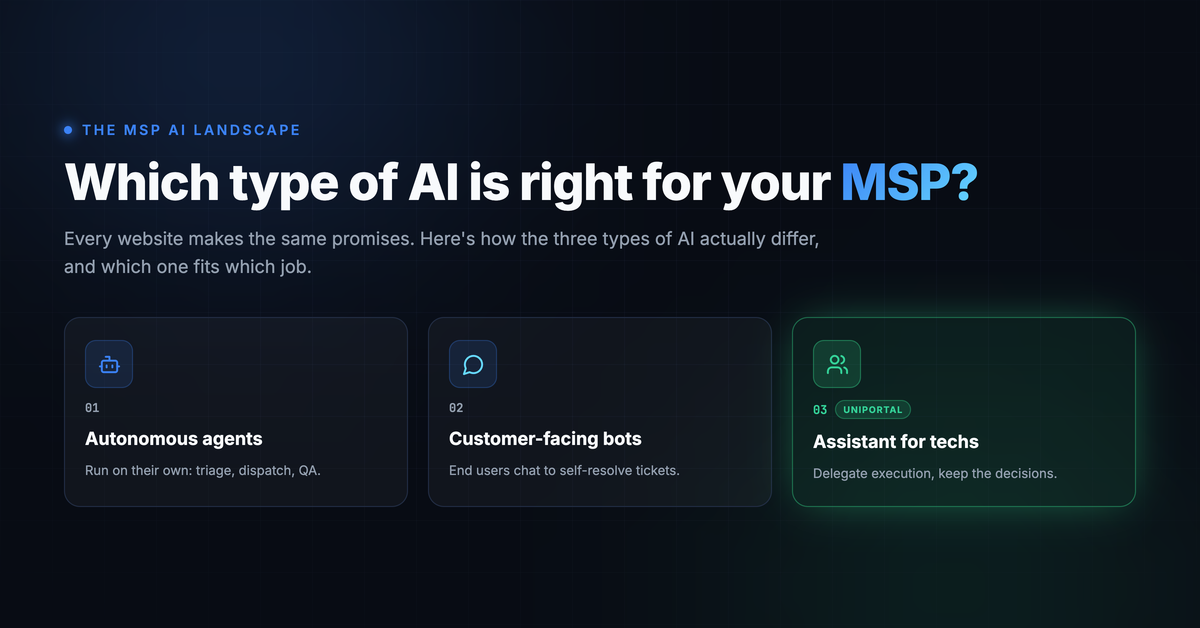
This post is focused on helping you understand the landscape. We will break the market into three main types of AI solutions, explain what each one does well, where each one struggles, and what may work best in what scenario.
The Three Buckets at a Glance
| 1. Autonomous AI Agents | 2. Customer-Facing AI Bots | 3. AI Assistant for Technicians | |
|---|---|---|---|
| Who it works for | Runs on its own, no human | Your end users | Your technicians |
| How it runs | Set it once, runs on configured rules with minimal input | End user chats with it directly | Technician delegates work to it and stays in the loop |
| Who decides | Mostly the AI, with some approval controls available | The AI, based on rules | Mostly the human, with some tasks delegated fully |
| Typical tasks | Triage, dispatch, QA on closed tickets | Password resets, basic access changes | Onboarding, offboarding, investigations, access changes, documentation |
| Maturity today | Reasonably mature | Least mature | Growing quickly |
| Main risk | Wrong routing, missing context | Security and prompt injection | Requires technician time to review |
1. AI Agents That Handle Help Desk Tickets
These mostly work autonomously. You set them up once and they run based on the rules you configure. No technician has to ask them to do anything.
Most of these products do have some human in the loop controls available. You can usually require approval on certain actions or route exceptions to a person. But that is not what they are designed around. They are designed to run on their own with minimum input, and the more approvals you add, the less you are getting out of them.
Here is what they are actually handling today.
Ticket Triage
The agent looks at an incoming ticket and assigns it a category, puts it on the right board, cleans up the title, and sets priority. Traditionally this is the work your front desk or dispatcher would do.
This is the most reliable use of autonomous AI today, because the work is repetitive and the cost of getting it slightly wrong is low.
Ticket Dispatch
Based on some simple rules, the agent decides who should be assigned the ticket. Some of the smarter solutions will even look at your past tickets to make that decision, learning who has historically handled similar work.
But there are complications involved, so it does not always work:
- The technician is off today. The agent does not always know that.
- It has no view of current workloads. So it may keep routing to one technician who happens to look like the best historical match, while that person is already buried.
- Historical patterns are not always the right pattern. The person who used to handle a client may no longer be on that account.
Dispatch is a good example of where autonomous AI gets you 80 percent of the way and then needs a human to catch the rest.
QA on Resolved Tickets
The agent reviews closed tickets to make sure resolution notes are properly added and time entries are in place.
This is useful for help desk managers who are trying to enforce quality and standardization across a team. Instead of spot checking tickets manually, or finding out at invoicing time that half the work was never logged, you get consistent review on every ticket. It is a good fit for autonomous AI because it is a checklist, not a judgment call.
Where this bucket fits: well-defined, repetitive workflows where the rules rarely change and the downside of a mistake is small.
2. Customer-Facing AI Bots
This is where your end users talk to an AI bot directly so it can auto-resolve some tickets.
There are really two flavours of this, and they carry very different levels of risk.
Flavour 1: Answering Questions Against Your Documentation
This is the safer half. The bot does not change anything. It looks things up in your documentation and knowledge base and answers common questions and troubleshooting steps.
Realistic examples:
- "How do I connect to the VPN from home?"
- "What is the guest wifi password for the Burnaby office?"
- "Outlook keeps asking me for my password, what do I do?"
- "How do I set up my work email on my new phone?"
- "Which printer is the one by the boardroom?"
- "How do I request a new monitor?"
These are tickets your team answers over and over, they have a documented answer, and the worst case if the bot gets it wrong is the user logs a ticket anyway. If your documentation is in good shape, this is a real deflection win with very little downside.
The catch is that it is only as good as your documentation. If your IT Glue or Hudu is out of date, the bot will confidently tell users the wrong thing.
Flavour 2: Taking Action on Behalf of the User
This is the riskier half. Instead of your customer filling out a form or logging a ticket to get something done, the AI resolves basic tasks for them:
- Password resets
- Access changes
- Contact information updates
- Status checks on existing tickets
This second flavour is the least mature part of the AI space right now, and for obvious reasons.
IT support involves sensitive systems and access changes. You cannot simply leave that to AI. AI is not a deterministic system. It can be tricked into doing things it should not do. Prompt injection is a real attack vector, and exposing your AI directly to end users opens you up to many more.
Think about what you are actually handing over. A bot that can reset passwords and change access is, by definition, a bot with the keys to your client's identity systems. If a user can talk it into doing something, so can an attacker who compromises that user.
There is a real future here, but it needs to be approached carefully, with tight scoping, strong identity verification, and hard limits on what the bot is allowed to touch.
3. AI Assistant for MSP Technicians
This is what we are building at Uniportal.ai.
This is an AI that works hand in hand with your technician to help them do more, and do it better. Think of it as a smart co-worker you can delegate tasks to.
An assistant can absolutely run some tasks on its own once you trust it with them. But that is not the point of it. It is designed to work alongside your technician, the same way a good co-worker does. Some things they just handle, and most things they check with you first.
The key distinction:
Decision making mostly stays with the human. Execution is done by the AI.
This is the future where one technician is able to support many more end users, or a small MSP is able to support many more customers, and provide services that only large MSPs could provide previously.
Here is what that actually looks like in practice.
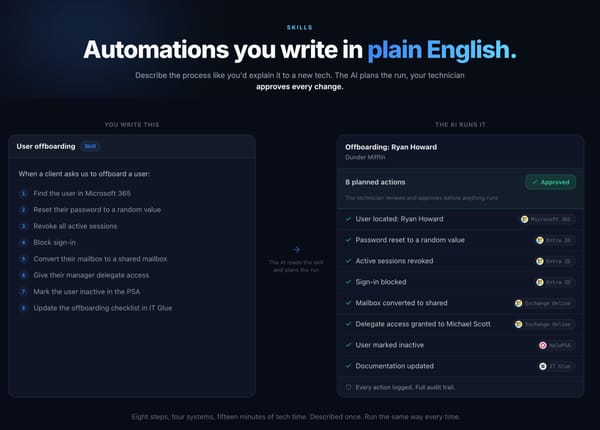
Example: An Offboarding Ticket
An offboarding ticket comes in. You ask the AI to review and analyze it.
- The AI reads the ticket, pulls the user details, and checks what the user has access to.
- The AI creates a plan: disable sign in, revoke sessions, convert the mailbox, reassign licenses, remove group memberships, handle OneDrive and delegate access.
- The plan comes back to the technician for approval.
- The technician confirms it is the right user and that the plan covers everything, then clicks approve.
- The AI goes and executes it, then adds the ticket notes and time entries.
The technician is there the whole time to answer questions, review the plan, and approve the work. But they are not clicking through five admin portals for twenty minutes.
Why offboarding should not be left to an autonomous agent. This looks like a clean, repeatable workflow, and it is exactly the kind of thing people want to fully automate. Here is what goes wrong when nobody is looking:
| What can go wrong | Why a human catches it |
|---|---|
| Wrong user. The ticket says "Mike S." and there are two of them, or it gives a display name that does not cleanly map to a UPN | The technician knows which one actually resigned |
| Wrong timing. The account gets disabled the moment the ticket lands, but the person has not been told yet and is still in the building | HR wants this done at 4:45pm on Friday, not at 9am when the ticket was created |
| Mailbox handling is client-specific. Convert to shared, forward to the manager, or place on litigation hold for compliance | The technician knows what this client's agreement says |
| The user owns something. A scheduled task, a service account, a shared calendar the whole team relies on, an app registration | Disabling breaks an integration nobody knew about until Monday |
| File ownership. Who gets the OneDrive data, and for how long | This is a business decision, not an IT one |
| It is not actually a termination. Parental leave, a contractor between engagements, a rehire two weeks later | An agent reading the ticket text may not tell the difference |
None of these are exotic. They come up constantly. An autonomous agent will either get them wrong quietly, or stop and ask, at which point you are back to a human in the loop anyway. The assistant model just makes that step deliberate instead of accidental.
Uniportal AI Assistant offboarding a user in a few minutes
Example: An ITDR Investigation
An ITDR ticket is logged. A user's sign in was blocked because of a new, unknown location.
The AI can quickly:
- Gather sign in logs
- Pull audit logs
- Identify any changes made to the account
- Present everything for technician review
Now the technician can ask the AI to fetch more data, or if they feel confident, they can make the call right there.
That decision is exactly what your customers pay you for. The gathering of evidence is not. The AI does the gathering, the technician does the judging.
Why This Model Works
Real-world IT rarely follows a perfect script. On paper, onboarding is a repeatable workflow. In practice:
- The requested Microsoft 365 license is not available
- The security group referenced in the ticket does not exist
- The group exists but has a slightly different name
- A provisioning step fails and needs a decision before continuing
These are not failures of AI. They are normal edge cases that happen every day in managed IT. Having a technician in the loop means those exceptions get handled instead of silently breaking.
There is also a speed advantage that gets overlooked. An AI assistant can work in parallel with your technician. While the technician is on the phone with a user, waiting for a response, or coordinating with a vendor, the AI can be investigating the issue, gathering context from documentation and past tickets, running diagnostics, drafting the customer email, and writing the internal notes.
Wrapping Up
So those are the three main buckets of AI technologies in the MSP market today:
| Bucket | Best For |
|---|---|
| Autonomous AI agents | Repetitive, rule-driven work like triage and QA where human judgment is rarely needed |
| Customer-facing AI bots | Documentation lookups and common questions work well today. Taking action for end users is still early and carries real security considerations |
| AI assistant for technicians | The bulk of day-to-day help desk work, where context and judgment matter |
Most tickets are not fully autonomous candidates. They involve exceptions, incomplete information, and customer-specific nuance. But almost every ticket can benefit from an AI assistant working alongside the person handling it.
Uniportal.ai is focused on helping MSP technicians do more with AI. We keep the decisions with your team and hand the execution to the AI.