AI Agents in IT Support: Now vs Future
How are AI agents actually getting used in IT support? It is one of the most important questions we keep asking ourselves while building Uniportal. We want to build things that get used: things IT teams are ready for and will rely on every day, not demos that look impressive and then sit on a shelf.
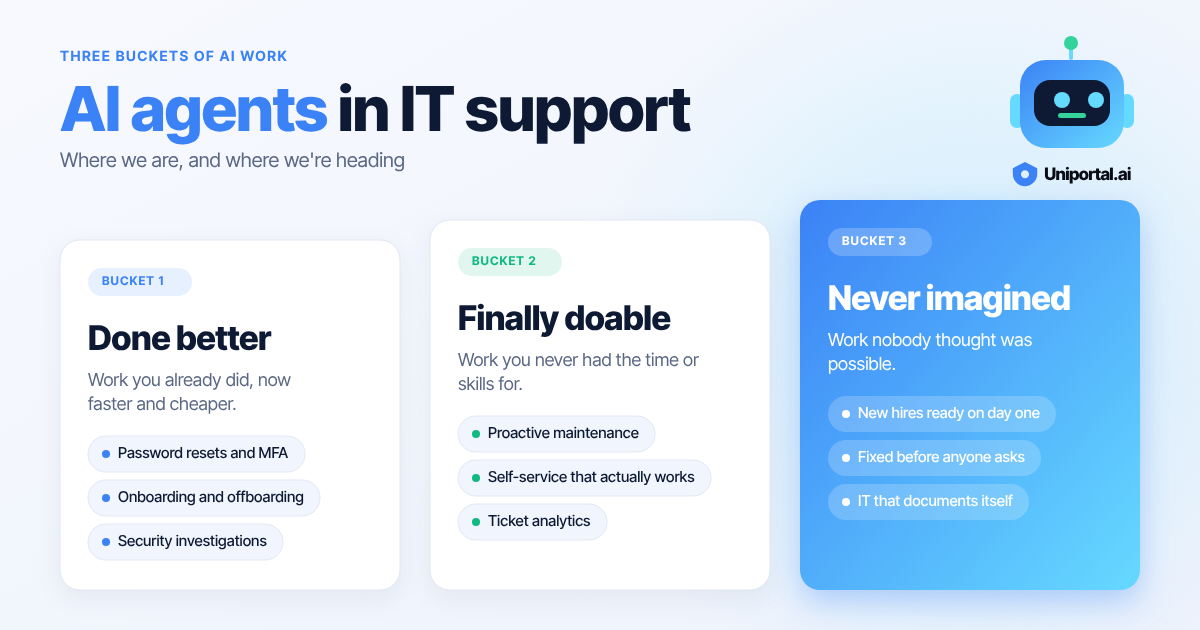
There is a framework we use to answer that question, and it has been incredibly helpful, so we want to share it. It sorts the work AI can do into three buckets:
- Things you used to do, that AI now does faster and better.
- Things you always wanted to do, but never had the time or the skills for.
- Things you never imagined were possible before AI.
The third bucket is the most exciting one. But you can't get there without moving through the first two, and that is not unique to AI. It is how every major technology gets adopted.
Think about the web. In the beginning, we used it to put old things online. The Yellow Pages became a directory website. The newspaper became a scanned PDF and then a news site. Same products, new medium. Only later did we get the truly web-native ideas: Uber, Airbnb, Facebook. None of those were a digital version of something that already existed. They only made sense once the web was everywhere.
AI is following the same path across all knowledge work. In this post we look at it through the lens we know best: IT support and the MSP helpdesk.
Bucket 1: The work you already do, done faster and better
This is where most MSPs are today, and it is where AI agents are already delivering real results. It is the Yellow Pages moment: the same work you have always done, moved onto a better medium.
Think about what fills a technician's day:
- L1 and L2 ticket resolution. Password resets, MFA issues, mailbox permissions, license changes, printer and VPN problems, slow machines.
- Onboarding and offboarding. Creating accounts, assigning licenses and groups, provisioning devices, and on the way out, disabling access, converting mailboxes and recovering hardware.
- Security investigations. Checking a suspicious sign-in, reviewing an alert, confirming whether a user clicked something they shouldn't have.
- Maintaining a secure posture. MFA coverage, stale accounts, admin rights that should have been removed months ago.
- Documentation. Keeping IT assets, configurations and procedures up to date, so the next technician doesn't start from zero.
None of this work is new. What has changed is who does the legwork. With Uniportal, a technician asks for an outcome inside the ticket, like "offboard this user" or "check this device", and the agent plans the steps using the MSP's own tools. The technician reviews and approves, and the agent carries it out.
The gains here are not only about speed. They are about consistency. The same onboarding runs the same way every time, whether it is your most senior engineer or a new hire on their second week. Steps don't get skipped at 4:55 on a Friday. And because the agent records what it did, documentation stops being a chore someone gets to "later" and becomes a byproduct of the work itself.
That is what we see across the MSPs running Uniportal today: workflows that run the same way every time, documentation that stays current, and onboardings and offboardings that just get done.
Bucket 2: The work IT always dreamed of doing
Every MSP has a list of things they know they should be doing. It shows up in QBR decks and strategy offsites. Very few ever get to it, because the helpdesk queue always wins.
That list usually looks something like this:
- Proactive maintenance. Patching on schedule, clearing disk space before it fills, replacing batteries and drives before they fail, renewing certificates before they expire.
- Fleet health checks. Spotting the machines that are slow, out of warranty, or quietly falling behind on updates.
- Security hygiene at scale. Finding vulnerable software versions across every client, risky configurations, unused admin accounts and gaps in MFA before an attacker does.
- Automation at scale. Turning repetitive work into scripts and runbooks across dozens of clients and hundreds of tenants.
- Billing reconciliation. Matching what you bill each client against what they actually use: Microsoft 365 licenses, endpoint and backup seats, security tools. Most MSPs know they are leaking revenue through unbilled seats and paying for licenses nobody uses, but reconciling it across every vendor and client every month is tedious enough that it rarely gets done properly.
- Ticket analytics. Understanding where technician time actually goes, which issues keep coming back, and which customers are the most expensive to service.
- Clean-up projects. Stale licenses, orphaned accounts, outdated documentation, inconsistent group policies.
The largest MSPs could staff a team for this. Everyone else needed a scripting expert, a data analyst and a spare week, usually all at once.
AI agents change that equation. Most of these tasks are now a short prompt. "Which five customers generated the most technician hours last quarter, and why?" is a question you can just ask. "Find every device across our clients running a vulnerable version of this software" no longer needs a custom script. And "compare this month's invoices against actual license and seat counts for every client" turns a full day of spreadsheet work into a report you review over coffee.
Go one step further and the work runs without being asked. Background agents can keep an eye on your fleet around the clock. They surface problems, flag security vulnerabilities and suggest fixes, so a technician starts the day with a short list of things to approve rather than a queue of fires.
This is the shift IT has talked about for decades: from reactive to proactive. For most teams it was always a goal on a slide. With agents doing the watching and the legwork, it becomes the default way of working.
Bucket 3: AI-native IT
This is the Uber and Airbnb moment, and by definition it is hard to picture. Nobody looking at the Yellow Pages in 1998 could have described a ride arriving at the tap of a button. So instead of predicting specific products, we want to describe what the experience might feel like.
In an AI-native world, IT simply stops being a problem people think about.
A new hire shows up on Monday and everything already works. Their laptop, accounts, apps and access were set up because the HR system said they were starting, not because someone filed a ticket. When they leave, access closes the same day, every time.
An employee who needs help doesn't fill out a form or wait in a queue. They describe the problem in plain language, in Teams or Slack, and it is resolved in the conversation. Most of the time they never needed to ask, because the agent noticed the failing drive or the expiring password first and handled it quietly.
Security stops being an annual audit and becomes a constant state. Configurations drift back into policy on their own. A suspicious sign-in is investigated, contained and documented before anyone opens their laptop in the morning.
The environment documents itself. Every change, every asset and every decision is recorded as it happens. The question "how is this client set up?" always has a current answer.
What happens to the people
None of this means IT people disappear. It means they stop spending their days on basic helpdesk operations.
The technician's job moves up a level. They set the policies agents follow, approve the decisions that matter, and handle the genuinely hard problems that need human judgment. More of their time goes to the work clients actually value: advising on strategy, planning projects, and understanding the business behind the technology.
For MSPs, this changes the business model too. When routine support is largely handled by agents, the value you sell is no longer hours of reactive labour. It is outcomes: uptime, security, a smooth employee experience. The MSPs who figure this out first will be able to serve more clients, better, without growing headcount at the same rate.
We don't know exactly what the Uber of IT support looks like yet. But we are confident it starts with the first two buckets done well.
Where to start
If you run an MSP or an internal IT team, the path is the same one the web took. Start with Bucket 1: put the work you already do on agents, with your technicians approving every step. Use the time you win back to finally tackle Bucket 2. Bucket 3 will follow from there.
That is what we are building at Uniportal. If you want to see what Buckets 1 and 2 look like on your own helpdesk, we would love to show you.